
A people profile shows a person's current role, contact details and background. Open one by clicking a person's name in a search, list or signal, or in a company's People section. Viewing a profile doesn't use credits.
People profiles are available on every plan.
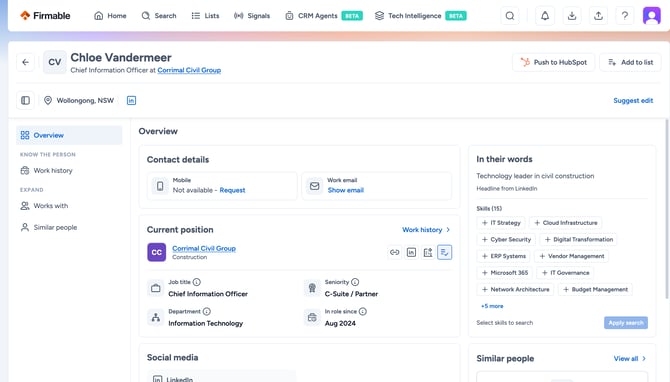
The top of the profile
- Under the person's name are their job title and company. If they have other current roles, you'll see how many next to their title.
- Next to the name are the same actions as on a company profile: push to your CRM or Re-enrich, and Add to list. See What's on a company profile.
- Below the name are their location and LinkedIn link, and Suggest edit to report wrong or missing data. See How to report incorrect data.
Overview
- Contact details: click Show number or Show email. Showing a work email is free. Showing a mobile number uses 1 credit, and only if Firmable has a number for that person (free if your organisation has already paid for that record). If a number is on the Do Not Call Register, the profile tells you. If we don't have a mobile or work email, you'll see Not available with a Request link. See How to request missing contact details.
- Current position: the person's company (with links to its website, LinkedIn, account intelligence and Add to list), job title, seniority, department and In role since. Any other current positions show below it.
- Social media: their LinkedIn profile, with followers and connections.
- In their words: their LinkedIn headline and skills. Select skills and click Apply search to find people with the same skills.
- Similar people: click Find similar people to see people like this one.
Sections
Use the menu on the left to open a section.
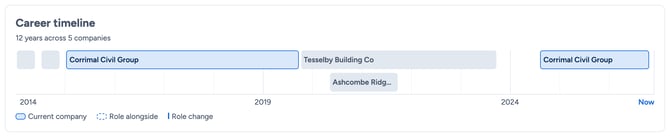
- Work history: a Career timeline covering the last 15 years, then every role grouped by company.
- Local registers: shows only when the person appears in a register, such as a company directors register, with the details of each.
- Works with: the person's colleagues at the same company. For managers and directors, choose Same level to see their peers in the same department, or One level above to see who's more senior. For leaders, it shows the company's other leaders.
- Similar people: people in similar roles, 10 at a time. Narrow them with filters, and add them to a list.
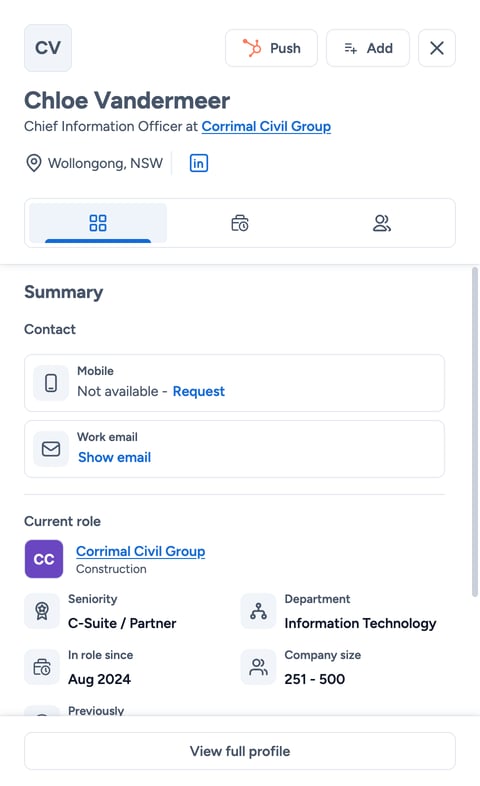
Quick view
Click a person's row in Search, Lists or Signals to open their quick view on the right. It shows their contact details, current role and other roles, with tabs for Work history and Works with. Click View full profile to open the full profile.
What uses credits
Viewing a people profile doesn't use credits, and neither does finding similar people. Showing a mobile number, downloading and pushing to your CRM use credits as usual. See When are credits consumed?
Learn more: