
Prerequisites
- You are on a Small Teams, Teams Pro or Enterprise plan with Firmable.
- You have the Admin role.
How to invite a new user
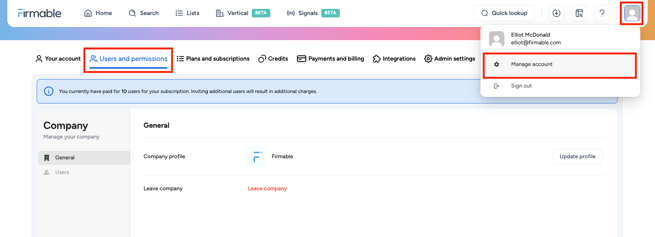
- Access your Firmable account, click your profile image in the top-right corner and click Manage account.
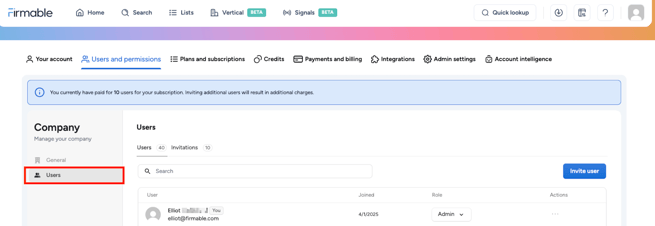
- In the Account settings sidebar, click on Users.
- Click on the Invite user button, enter the email addresses of the individuals you want to add to your organisation, select the desired Role, and then click on Send invitations. If you want to invite multiple users, enter or paste one or more email addresses, separated by spaces or commas.
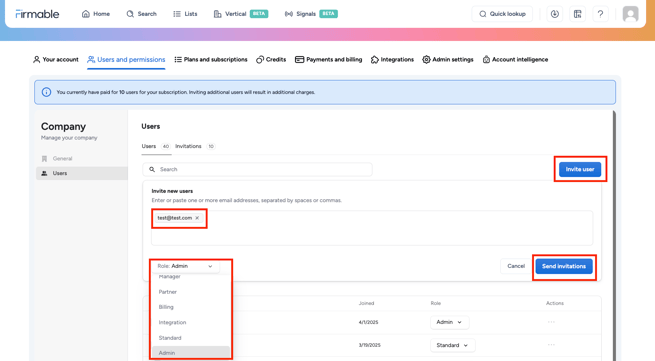
Role types:
- Admin: Full platform access including access to integrations, credit management, and ability to add/edit users. (Paid user)
- Standard: Standard platform access including ability to search, view, and export data. (Paid user)
- Integration: Limited user access for integration setup only (no platform access to search and export data). If you need to manage an integration and have platform access, apply the Admin role. (Unpaid user)
- Billing: Limited user access to update payment details and view invoices (no platform access to search and export data). (Unpaid user)
- Manager: A combination of the Integration and Billing role types (no platform access to search and export data). (Unpaid user)
- Partner: For Firmable-certified partners to access your account. Same platform access as a Standard role, plus access to Account settings (including Integrations, Users, Subscriptions, Billing and Credits) except Country preference.
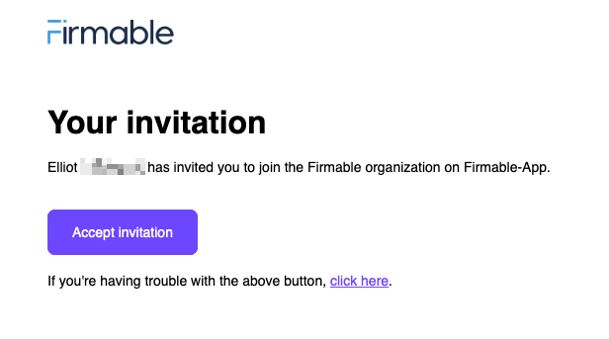
- Invited users will receive an email containing an Accept invitation button. Clicking on this button allows them to join the Firmable organisation and complete their user setup.
Note: Additional users will incur extra charges, calculated pro-rata based on the remaining time in your billing cycle.
Learn how to create a new account and subscribe to Firmable