
Prerequisites
- You are on a Small Teams, Teams Pro or Enterprise plan with Firmable.
- You have the Admin, Manager, Partner or Integration role on Firmable.
Find your credentials
- Click your profile picture (top right) and select Manage account.
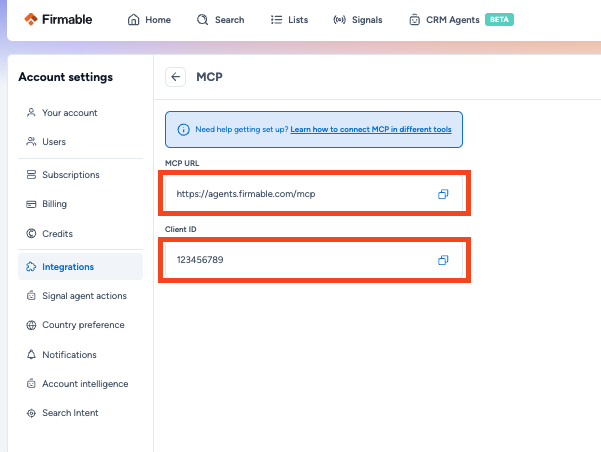
- Select Integrations in the Account settings sidebar, then click MCP.
- Click the copy buttons to copy the Client ID and MCP URL.
Which credentials does each tool need?
- Claude (web and desktop): MCP URL and Client ID.
- Cursor, Claude Code, Windsurf and Codex: MCP URL and Client ID.
- ChatGPT: MCP URL and Client ID when you add the app manually. Enter the MCP URL in the Connection field and the Client ID under Advanced OAuth settings. Leave the secret blank unless Firmable has given you one.
- Microsoft 365 Copilot: MCP URL and Client ID from the MCP card as above, plus the OpenAPI file and Client Secret from Firmable support. You can request these by emailing support@firmable.ai.