
What is a Firmable ID?
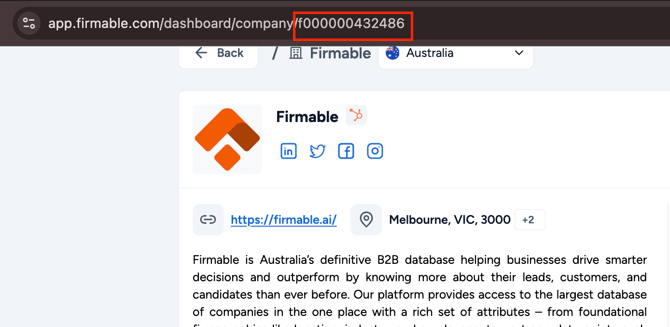
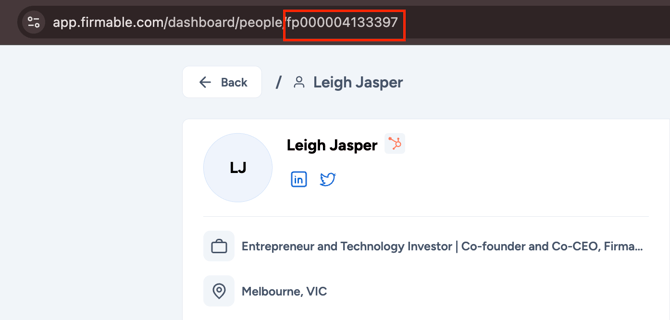
Every company and person record in Firmable has a unique Firmable ID that never changes. Even if a person changes job title, moves to a new company, or a company changes its name or domain, its Firmable ID stays the same. This makes it a more reliable match key than fields that change over time, such as email address, job title, or company name.
Why map it into your CRM
Most CRM matching (email for contacts, domain or website for companies) works well most of the time, but can break the moment someone changes jobs or a company rebrands. A dedicated Firmable ID field on your CRM records means Firmable can always find and update the right record, even after those changes, without creating a duplicate.
This matters most if you're on 2-way CRM sync or pushing a high volume of records. The more your CRM relies on Firmable to keep records current, the more a stable match key protects that relationship long-term.
Prerequisites
- You have the Admin, Manager, Partner or Integration role on Firmable and the ability to create custom fields in your CRM.
- Your CRM is connected to Firmable.
How to set it up
- In your CRM, create a custom field to hold the Firmable ID, for example Firmable ID or Firmable Record ID. Field type should be a plain text field of at least 20 characters. Company IDs are a lowercase "f" followed by 12 digits (for example, f000001729377) and person IDs are "fp" followed by 12 digits, so 20 characters fits both.
- This field doesn't need to be visible to your reps or shown on any page layout; it's only used for matching behind the scenes.
- Repeat this on every object you sync: Company/Account, Contact, and Lead if applicable.
- In Firmable, click your profile picture (top right) and select Manage account, then select Integrations in the Account settings sidebar. Open your CRM and map the Firmable ID field to this custom field on each field mappings page (for example, Contact field mappings).
- Push or sync a test record and confirm the Firmable ID value has landed in your CRM's new custom field.
Frequently asked questions
-
Do I need to expose this field to my sales reps? No, it's for matching only. Most customers keep it hidden from page layouts.
-
Does this replace my existing dedup logic (email, domain)? No, it works alongside it. Firmable still matches on those fields where possible; the Firmable ID is what keeps that match intact once those fields change.
-
What happens if I don't map it? Firmable falls back to matching on email or domain, which can create a duplicate record if a contact changes companies or a company changes its domain.