
Your free trial lasts 14 days. You don't need a card to start it, so you aren't charged when it ends.
During the trial
- If no payment method has been added, a banner shows how many days are left. An admin can click Activate subscription on the banner at any time.

- On the Plans and subscriptions page, choose the plan you want and continue to checkout. You can stay on the plan you trialled or move to a smaller one.
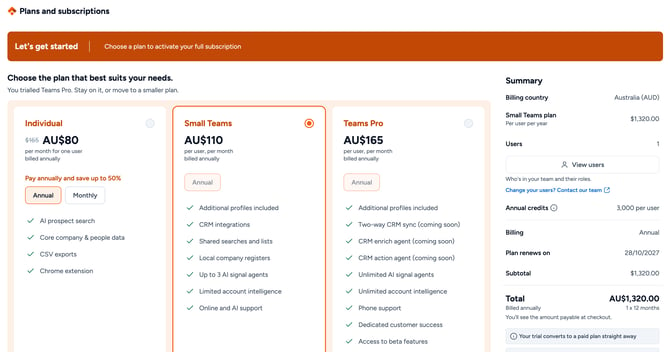
Activate your plan before the trial ends
- Click your profile picture (top right) and select Manage account, then select Subscriptions. Your plan shows that the trial is active and when the paid plan starts.
- If a payment method has been added, click Activate plan. If not, the button reads Choose a plan and takes you to the plan selection page instead.

- Check the plan and amount, then click Continue. This ends your trial and starts your paid plan straight away.
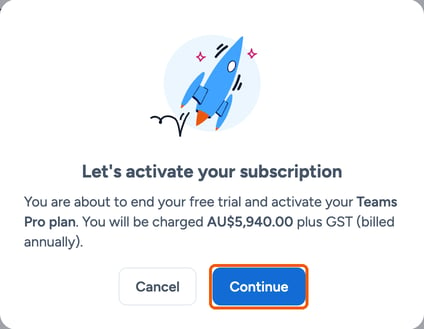
When the trial ends
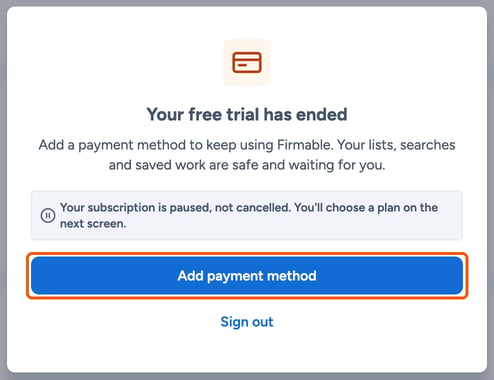
If no payment method has been added, your subscription is paused, not cancelled. Your lists, searches and saved work are kept.
- Admins see Your free trial has ended. Click Add payment method, then choose a plan on the next screen.
- Other users are told the trial has ended and access is paused. Ask your admin to set up a subscription.
- While the subscription is paused, nobody in your organisation can use Firmable, including through MCP.
Once an admin adds a payment method and chooses a plan, everyone has access again.
Learn more: