
Prerequisites
Market signals are available on the following plans:
- You are on a Small Teams, Teams Pro or Enterprise plan with Firmable.
Overview
Market signals are a type of signal agent that scans the entire Firmable database for matching buying triggers, rather than watching a list of accounts you already know.
Where a standard list-based signal agent monitors specific lists you have saved, a market signal has no list requirement; the whole Firmable database is the canvas. This makes market signals the go-to tool for pure prospecting: finding net-new accounts before they appear on any target list.
How market signals work
When creating a signal agent, there are two scopes to choose from:
- List-based: the agent watches up to 5 of your Firmable lists and surfaces signals on those accounts.
- Market-level (market signals): the agent skips the list step entirely and scans the whole Firmable database for matching signals.
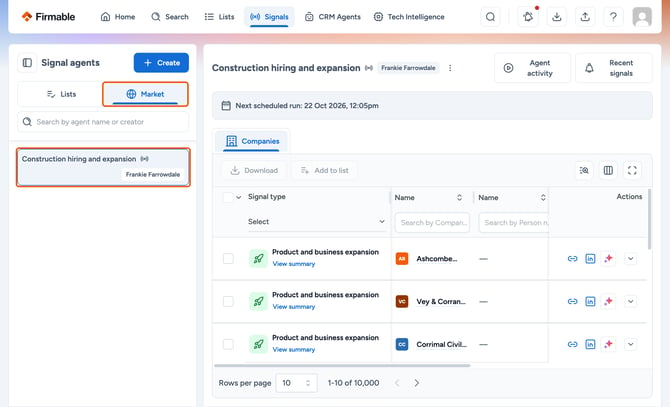
The same signal types are available in both modes, such as new C-suite appointments, new job postings, mergers and acquisitions, restructures, partnerships and product launches. The difference is scope: known accounts versus the open market.
Credits and plan eligibility are the same as for standard signal agents; there is no separate market signals entitlement.
When to use a list-based agent instead
Use a list-based agent when the accounts that matter are already known: a named target list, a customer base, or a specific territory. Market signals are for finding the next account; list-based agents are for watching the accounts already in scope.
When to use a market signal
Market signals are best suited to prospecting scenarios where the accounts are not yet known.
- Building a brand-new prospecting pipeline where no target list exists yet.
- Finding companies going through a merger or acquisition across the whole market.
- Identifying companies with newly appointed executives that are not on any current watch list.
- Spotting hiring patterns in a specific function or role type across the broader market.
Using both together
Most teams will run both types at the same time. List-based agents cover known accounts; market signals find new ones. The two approaches complement each other and can be run in parallel from the same signals page.
Available signal types
Company signal types you can use with a market signal agent include the following. You can select up to 5 signal types per agent.
- New C-suite appointment
- Recruitment and hiring
- New job posted
- Mergers and acquisitions
- Reorganisation and restructuring
- Partnership announcement
- Financial updates
- New product and service launch
Creating a market signal
- Click Signals in the navigation, then click Create.
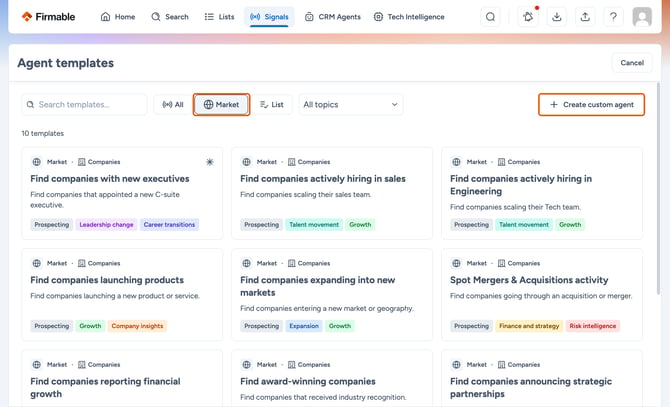
- In the template gallery, pick a market template, or click Create custom agent.
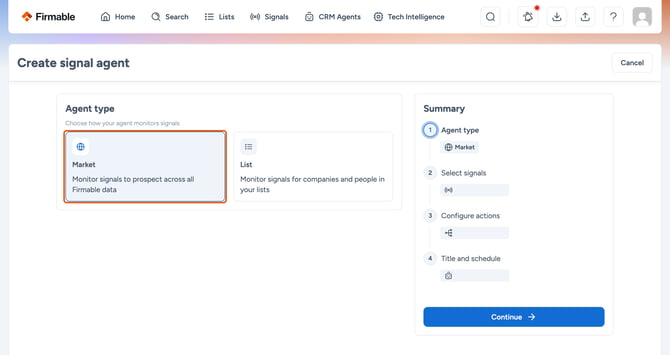
- In the Agent type step, choose Market and click Continue.
- In Select signals, choose up to 5 signal types that match the play you want to run.
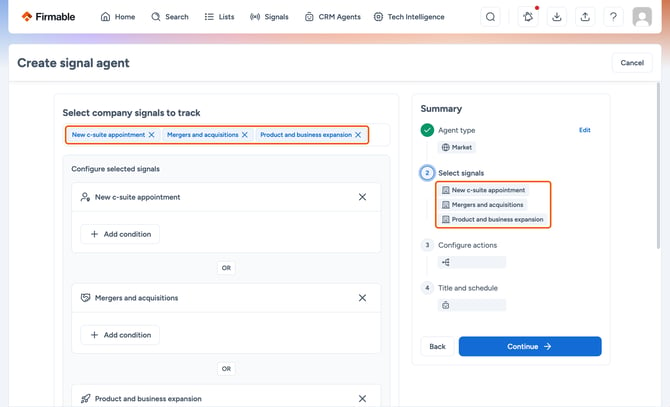
- To narrow a signal, click Add condition under it. The conditions available depend on the signal type.
- In Configure actions, set up any CRM actions or webhook you want the agent to run.
- In Title and schedule, name the agent and choose a Daily or Weekly run schedule.
- Click Create agent. The agent will begin scanning the entire Firmable database and surface matches as they come in. Signals may take up to 1 hour to generate.
Frequently asked questions
How is a market signal different from a list-based signal agent?
A list-based agent watches accounts on a list that has already been created. A market signal scans the whole Firmable database for matching events. The signal types available are the same. The difference is scope.
Can both types be run at the same time?
Yes. Running both together is the recommended approach for most teams. List-based agents cover known accounts; market signals surface new ones.
Is there a separate template gallery for market signals?
No. The signal templates gallery includes both list and market templates. Click Market at the top of the gallery to see only market templates.
Do market signals cost extra credits?
No. Credits work the same way as for all signal agents. There is no separate entitlement for market signals.