
The People tab in Search can return multiple people records from the same company. The Show 1 person per company toggle lets you cut through the noise by surfacing only the most complete and senior person at each company that matches your filters. This is particularly useful when building targeted prospect lists where you only need one point of contact per account.
How to use Show 1 person per company
- Navigate to the Search page
- Apply your desired filters (for example, industry, location, revenue, or employee count)
- Click the People tab at the top of the results
- Click Show 1 person per company in the top right of the results panel
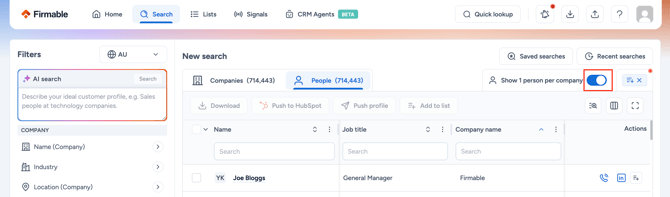
Firmable will return one people record per company, prioritising the most complete and senior match based on your applied filters.
Layer with department filters for more targeted results
- After enabling Show 1 person per company, apply a department filter (e.g. Marketing, Finance, Sales) in the left-hand panel
- Firmable will return the most senior and complete person in that department at each company
This is useful when you need to reach a specific function within an organisation rather than the most senior person overall.
Credits and exports
- Enabling Show 1 person per company reduces the number of records returned, meaning fewer credits are used when pushing or downloading results
- Each people record pushed or downloaded costs 1 credit, so filtering to one person per company before exporting helps avoid spending credits on duplicate company contacts