
What are keywords?
Every company record in Firmable includes a list of keywords drawn from across the web, including LinkedIn, job boards, business directories, and other public sources. These keywords reflect the topics, industries, products, services, and themes associated with each company.
Keywords help you find companies that match a specific focus area, even when that focus isn't captured by standard filters like industry or location.
You can view a company's keywords on its company record, and use the Keywords filter in search to find companies that match terms you care about.
Using the Keywords filter
- Navigate to the Search page and open the filter panel.
- Under the Company section, click Keywords.
- Type a keyword or phrase into the search field.
- Firmable will suggest a "Contains" match for your term, as well as related keyword suggestions to help you refine your search.
- Click the + icon next to any keyword to add it to your filter.
Multiple keywords are combined using an OR logical operator by default, meaning results will include companies matching any of the selected keywords.
Excluding keywords
To exclude companies that match a specific keyword, click the exclusion icon (the circle with a line) next to the relevant keyword suggestion. Excluded criteria are removed from your search results entirely.
Viewing keywords on a company record
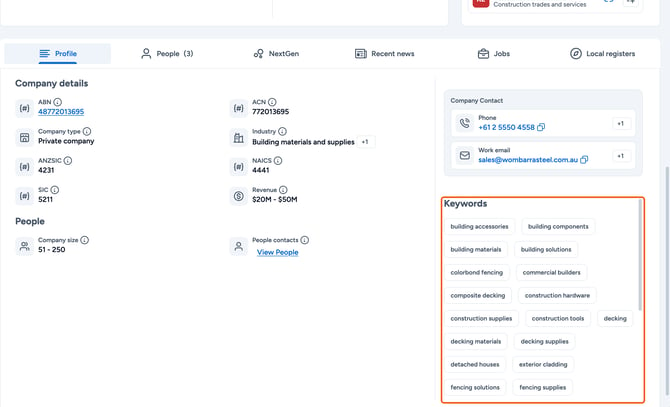
Keywords for each company are displayed in the Keywords section of the company record, visible on the Profile tab. These tags reflect the topics and themes Firmable has identified for that company based on data sourced from across the web.
Frequently asked questions
Can I add multiple keywords to a single search?
Yes. Each keyword you add is combined using OR logic, so your results will include any company matching at least one of the selected terms. There is no limit to how many keywords you can add.
Where do the keyword suggestions come from?
Firmable surfaces related keyword suggestions as you type to help you discover relevant terms you may not have considered. These are based on keywords already present across the Firmable database.
Can I use keywords alongside other filters?
Yes. Keywords work alongside all other filters on the Search page, such as industry, location, employee count, and revenue.
Are keywords the same as industry tags?
No. Industry is a structured classification applied to each company. Keywords are broader and more varied, covering a wider range of topics, themes, and descriptors drawn from multiple sources. Keywords can be a useful complement to industry filtering when you want more specific or niche targeting.