
In this article, we will explain the process we follow to ensure that the emails available on Firmable are reliable, how to filter on different email deliverability measures, and how to use them.
How do we verify our email addresses?
We know how important it is for you and your business to be confident that your emails will get delivered, which is why we have a multi-step email verification process in place, using several email verification tools, to ensure we have the best quality contact information available.
Invalid emails are removed from the platform, valid emails are categorised with different measures that you can filter on, and we have an ongoing process in place to continuously cleanse and build on our email database.
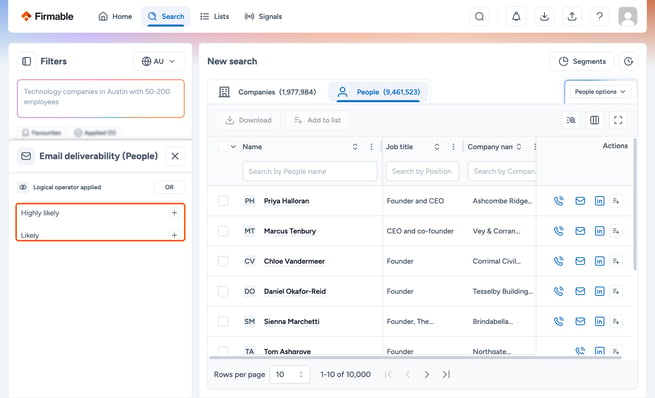
The Email deliverability filter allows you to filter all our people results by the likelihood that the email is accurate and will be delivered. The categories are:
- Highly likely: Emails that are highly reliable and have a high probability of successful delivery.
- Likely: While these emails have a good chance of being deliverable, there might be a slightly higher chance they’re not delivered compared to those categorised as Highly likely.
Any other emails remaining have been through our multi-step validation process but may or may not have a high chance of deliverability.
How to use the Email deliverability filter in Firmable
Follow these steps to use the Email deliverability filter:
- Begin by navigating to the Search page.
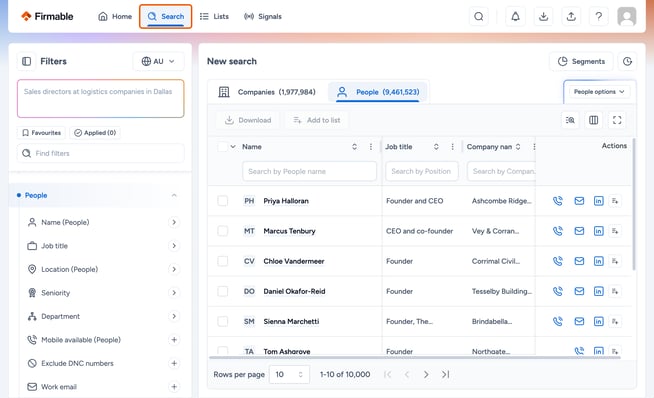
- Find the Email deliverability filter under People filters, on the left panel.

- Once you have clicked on the filter, you will see the categories mentioned above: Highly likely and Likely. Click + next to one or both to narrow your search exclusively to those people who have an email with a strong likelihood of delivery.
Learn more about how to prevent your emails from bouncing.