
When exporting records from Firmable, you can customise which fields are included in your download. Exports are available for both company records and people records, and each export uses 1 credit per record (except records previously downloaded).
The exported file is sent to your email and can also be accessed from your Download Centre.
Company record export fields
When exporting a company record, you can select from the following field categories. Use Select all or Clear all to manage selections in bulk, or click individual checkboxes to customise your export.
Basic info: Fields that identify the company and provide core descriptive information.
- Company name
- Website
- Domain name
- Firmable company link
- Year founded
- Company type(s)
- Business identifier
- Source
- Tagline
- Description
Company metrics: Quantitative data about the size and structure of the company.
- Employee count (Global)
- Employee count (Local)
- Employee count range (Global)
- Employee count range (Local)
- MNC
- Revenue range
Contact information: Primary and secondary contact details for the company.
- Primary phone
- Other phones
- Primary email
- Other emails
Industry classifications: Industry and classification codes to help with segmentation and targeting.
- Primary industry
- Other industries
- SIC
- NAICS
- ANZSIC
- Target customer
- Target market
Location data: Physical address and location fields for the company's registered and operating locations.
- HQ street
- HQ suburb
- HQ state
- HQ postcode
- HQ country
- Location suburb
- Location postcode
- Location state
- Other locations
- Addresses
- Multiple locations
- Location details
Social media profiles: Links to the company's social media presence.
- Twitter (X)
- YouTube
- Keywords
- Services
- Products
Web analytics and technology: Website traffic data and technology stack categorisation.
- Total web visitors
- Bounce rate
- Pages / visit
- Avg visit duration
- Paid traffic share
- Organic traffic share
- Country traffic share
- Software development
- Finance and accounting
- Hosting and operations
- Content and media
- Sales and marketing
- Customer management
- Analytics
- HR and payroll
- Other
People record export fields
When exporting a people record, the following field categories are available.
Basic info: Core identifying information for the individual.
- First name
- Middle name
- Last name
- Name
- Firmable person link
- Source
Company info: Details about the person's current employer as held in Firmable.
- Company name
- Company website
- Firmable company link
- Company LinkedIn
- Employee count range (Global)
- Industries
Email: Work email addresses and their deliverability status.
- Primary work email
- Primary email deliverability
- Other work emails
- Other emails deliverability
Location: The person's location information.
- Suburb
- State
- Country
Mobile: Mobile phone numbers and Do Not Call (DNC) status.
- Primary mobile
- Primary mobile DNC
- Secondary mobile
- Secondary mobile DNC
- Other mobiles
- Other mobiles DNC
Role: Professional role and employment details.
- Position
- Year joined
- Month joined
- Department
- Headline
- Skills
Social: Social media profile data for the individual.
- Connections
- Followers
- Twitter (X)
Local data by country
When exporting company records, Firmable gives you the option to include local data for specific countries. This is particularly useful when a company operates in multiple markets, for example, a US-headquartered company like McDonald's may also have a local presence in Australia, Japan, or other countries.
What local data means
HQ data reflects the company's global headquarters information. Local data reflects how that company operates within a specific country. Selecting a country at export includes that country's local fields alongside the HQ fields, not instead of them. The two can differ significantly: a multinational may have thousands of employees globally but only a few hundred locally, operate under a different local business registration, or run an entirely separate local website.
Each country can have its own locally-specific data points. Where Firmable holds this data, it will be included in your export. Examples of what local data can contain include:
- Local business identifier: each country uses its own business registration format. For example, Australian entities have an ABN (Australian Business Number), New Zealand entities have an NZBN (New Zealand Business Number), and other supported countries have their own equivalent identifiers.
- Local website: many companies operate a country-specific domain or subdomain separate from their global site. For example, a company with a global .com may also have company.com.au for Australia, company.co.nz for New Zealand, or jp.company.com for Japan.
- Local employee count: the number of employees based in that specific country, which can differ substantially from the global headcount.
- Local address: the registered or operating address within that country, rather than the company's global HQ address.
- Local phone numbers: contact numbers for that country's office or local operations.
- Local industry classifications: certain markets use their own classification systems. For example, ANZSIC is specific to the AU and NZ markets and will be populated for companies operating in those countries.
Note: Local data availability varies by company and country. If Firmable does not hold local data for a specific company in a selected market, those fields will appear empty in the export.
Available countries
At the point of export, you can select which country's local data to include. The currently available countries are:
- Australia
- New Zealand
- Singapore
- Malaysia
- Indonesia
- Philippines
- Hong Kong
- Japan
How to select local data
- Click the Include local data for dropdown at the point of export
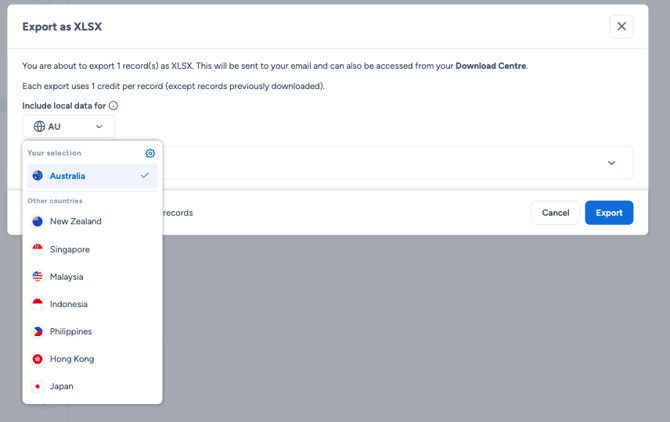
- Your current selection will be shown at the top (e.g. Australia)
- Select a different country from the Other countries list to switch
Note: The countries available to you will reflect the country scope configured on your Firmable account. If you need access to additional countries, contact your Firmable account manager.